
How to Filter Blog Posts
If you'd like to edit, copy or delete a specific blog, you can use the Filtering options in the top bar above the Blog list to search for the blog you'd like to adjust. Follow our filtering guide below to learn how:
1) Log in to your FYZICAL Hub Account at hub.fyzical.com/

2) In the Main Menu click on Content, then head over to the Blog submenu.

3) You will be able to use the filtering bar to find relevant blog posts.
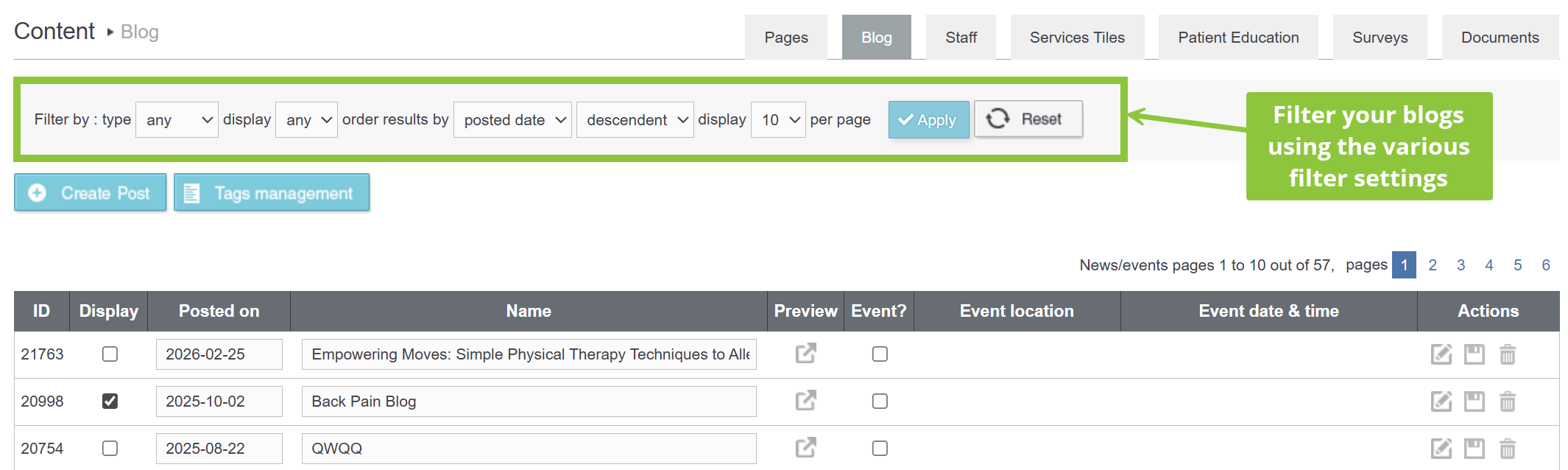
- From the Type drop down list, select the type of blog. The available options are Any, News and Events.

- You can filter results based on whether the blog is published and displaying on your website. The available options are Any, Yes and No.

- With the Order Results by drop down list you can filter blogs based on the date of posting, event date or name.

- You can further filter the blogs either in ascending or descending order by selecting the appropriate option from the drop down list.

- With the Display per page dropdown you can specify the number of blogs to be displayed on a page. The available options are 5, 10 and 20.

4) Click the blue Apply button to filter your search. The results will be displayed based on the filters applied.